
How to Leverage the Right Tools for Deferred Revenue Calculations
Can you imagine 3,000 customers and working on each specific level of deferred revenues? And, if you are in software, think of all the different ways your end customer can package and purchase software. Recognizing revenue too early is what usually gets companies in trouble so you want to do things systematically regarding revenue recognition and deferred revenue calculations.
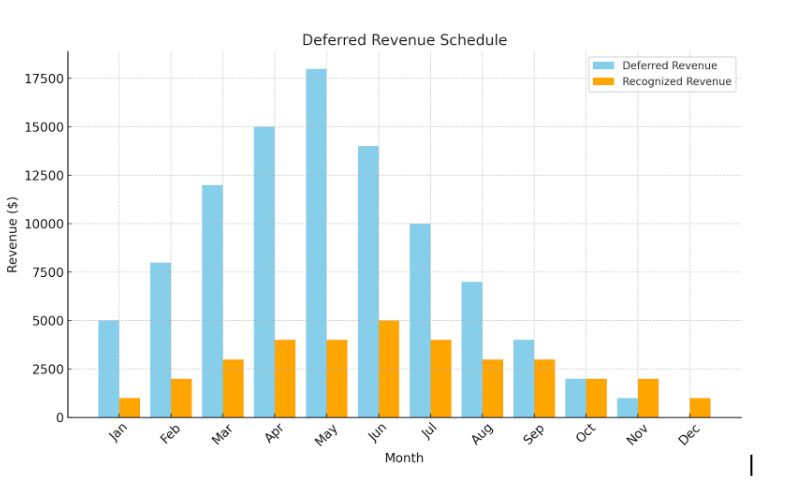
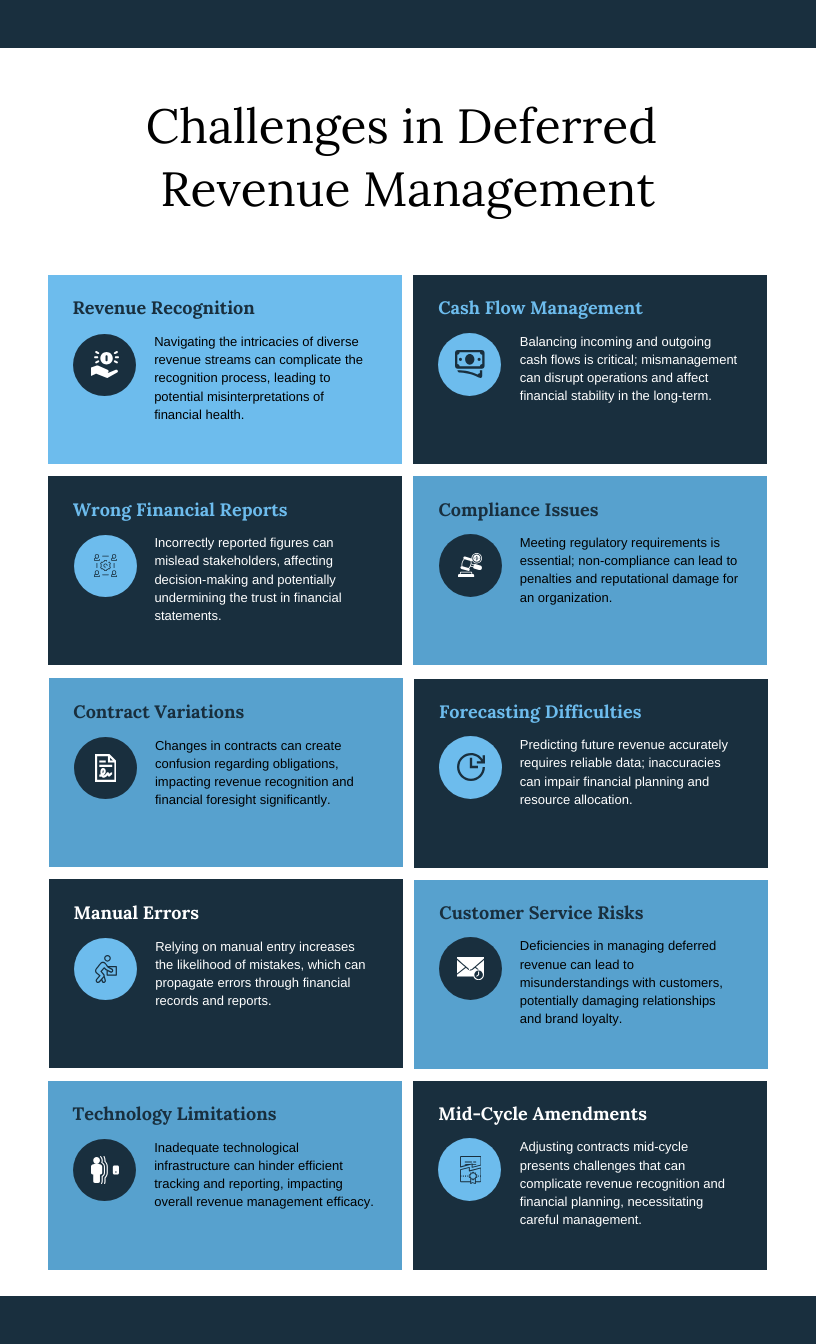
Deferred revenue, (we have seen it done wrong many times) is a critical aspect of revenue recognition, and poses unique challenges for businesses, especially those operating in subscription-based or SaaS industries. Traditionally managed through spreadsheets, deferred revenue calculation becomes cumbersome, error-prone, and inefficient as businesses scale. Fortunately, modern tools have emerged to address these challenges, providing automated solutions that ensure accuracy, compliance, and efficiency. The chart below shows how revenue rec and deferred revenues look drastically different.
ASC 606 and the rules to abide by
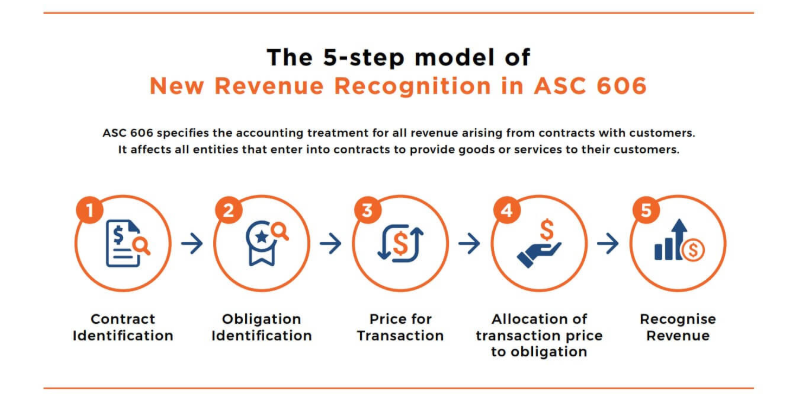
ASC 606 Overview and Deferred Revenue ASC 606, the revenue recognition standard issued by the Financial Accounting Standards Board (FASB), establishes a comprehensive framework for recognizing revenue from contracts with customers. Under ASC 606, revenue is recognized when a company satisfies its performance obligations, which occurs when control of goods or services is transferred to the customer.
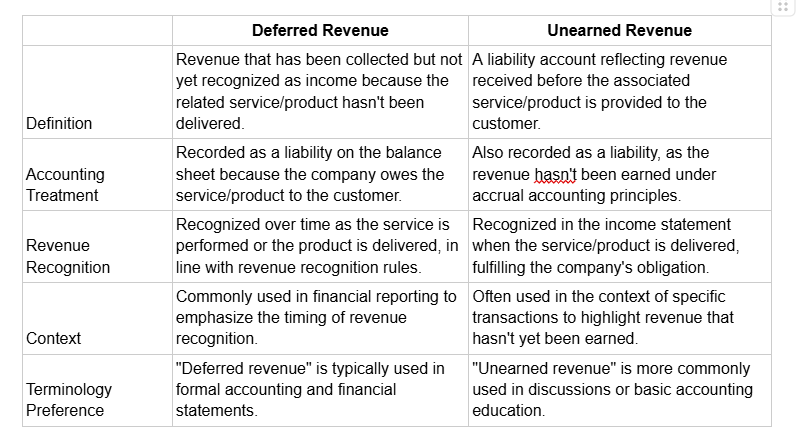
Deferred revenue arises when a company receives payment from a customer before fulfilling its contractual obligations. For instance, if your company collects advance payments or deposits for services or goods to be delivered in the future, these amounts must be recorded as a liability on the balance sheet under "Deferred Revenue" or "Unearned Revenue." This ensures that the revenue is not prematurely recognized, aligning financial reporting with the core principle of ASC 606: recognizing revenue in a manner that reflects the transfer of promised goods or services. Now there are some differences between deferred and unearned revenue as highlighted below:
Key Difference for both of these liabilties:
-
Deferred Revenue highlights the accounting perspective, focusing on revenue recognition over time.
-
Unearned Revenue emphasizes the customer’s advance payment and the obligation yet to be fulfilled.
Deferred Revenue and the Five-Step Model
ASC 606 is a five-step model to guide revenue recognition, which directly impacts how deferred revenue is managed. Companies must first identify the contract with the customer and then determine the performance obligations within the contract. For deferred revenue, the key is determining when the company satisfies these performance obligations, as revenue can only be recognized when control of the goods or services transfers to the customer.
For example, if your company provides a subscription service, it would defer revenue upon receiving the subscription fee and then recognize it ratably over the service period as the obligation is fulfilled. This framework ensures deferred revenue reflects the company’s obligation to deliver future value, providing a clear and transparent view of the timing and pattern of revenue recognition in compliance with ASC 606.
The Limitations of Spreadsheets
While spreadsheets offer flexibility and familiarity, they have significant drawbacks when it comes to deferred revenue:
-
Manual Entry Errors: Spreadsheets rely heavily on manual input, increasing the risk of errors in formulas and data.
-
Lack of Scalability: As transaction volumes grow, spreadsheets struggle to handle complex calculations and large datasets.
-
Compliance Risks: Adhering to standards like ASC 606 or IFRS 15 requires precise tracking, which spreadsheets may not easily support.
-
Time-Consuming Processes: Manual adjustments and reconciliations can consume valuable time, delaying financial reporting.
Advanced Tools for Deferred Revenue Management
We've seen crazy spreadsheets (waterfalls, diagrams, charts, etc). There is a better way and we highlight some tools that go beyond spreadsheets:
1. NetSuite Revenue Recognition
NetSuite’s revenue recognition module automates the entire revenue lifecycle, ensuring compliance with ASC 606 and IFRS 15. Key features include:
-
Automated calculation of deferred revenue schedules.
-
Multi-element arrangement support.
-
Real-time reporting and dashboards.
Fit: Ideal for mid-to-large-sized enterprises with complex revenue recognition needs and existing ERP systems.
2. Sage Intacct Revenue Management
Sage Intacct streamlines deferred revenue calculations with features such as:
-
Template-driven schedules for recurring revenue.
-
Seamless integration with billing systems.
-
Detailed audit trails for compliance.
Fit: Best suited for growing businesses needing advanced reporting and integration capabilities. Sage is particularly good for SaaS and we've had much success with it.
3. RevPro by Zuora
RevPro is a leading tool for revenue recognition, particularly for subscription-based businesses. It offers:
-
ASC 606 and IFRS 15 compliance.
-
Automated revenue allocation and forecasting.
-
Integration with popular ERP systems.
Fit: Tailored for SaaS and subscription businesses requiring robust automation and scalability. The pricing is what some dont like.
4. Chargebee
Chargebee simplifies subscription management and deferred revenue tracking with:
-
Automated revenue recognition for recurring payments.
-
Granular reporting on deferred and recognized revenue.
-
Easy integration with accounting systems like QuickBooks and Xero.
Fit: Ideal for small to medium-sized subscription-based businesses seeking affordability and flexibility.
5. FloQast Revenue
FloQast Revenue more a close management platform also provides a collaborative approach to revenue recognition. Its features include:
-
Automated deferred revenue calculations.
-
Integration with ERP and billing platforms.
-
Enhanced visibility for month-end close processes.
Fit: Suitable for companies looking for a collaborative tool that simplifies month-end close processes.
6. QuickBooks Advanced Reporting
For small to mid-sized businesses, QuickBooks Advanced Reporting offers:
-
Custom templates for deferred revenue schedules.
-
Automated journal entries to recognize revenue.
-
Integration with other QuickBooks modules for seamless operations.
Fit: Best for small businesses already using QuickBooks for accounting and seeking a cost-effective solution.
Benefits of Adopting Specialized Tools
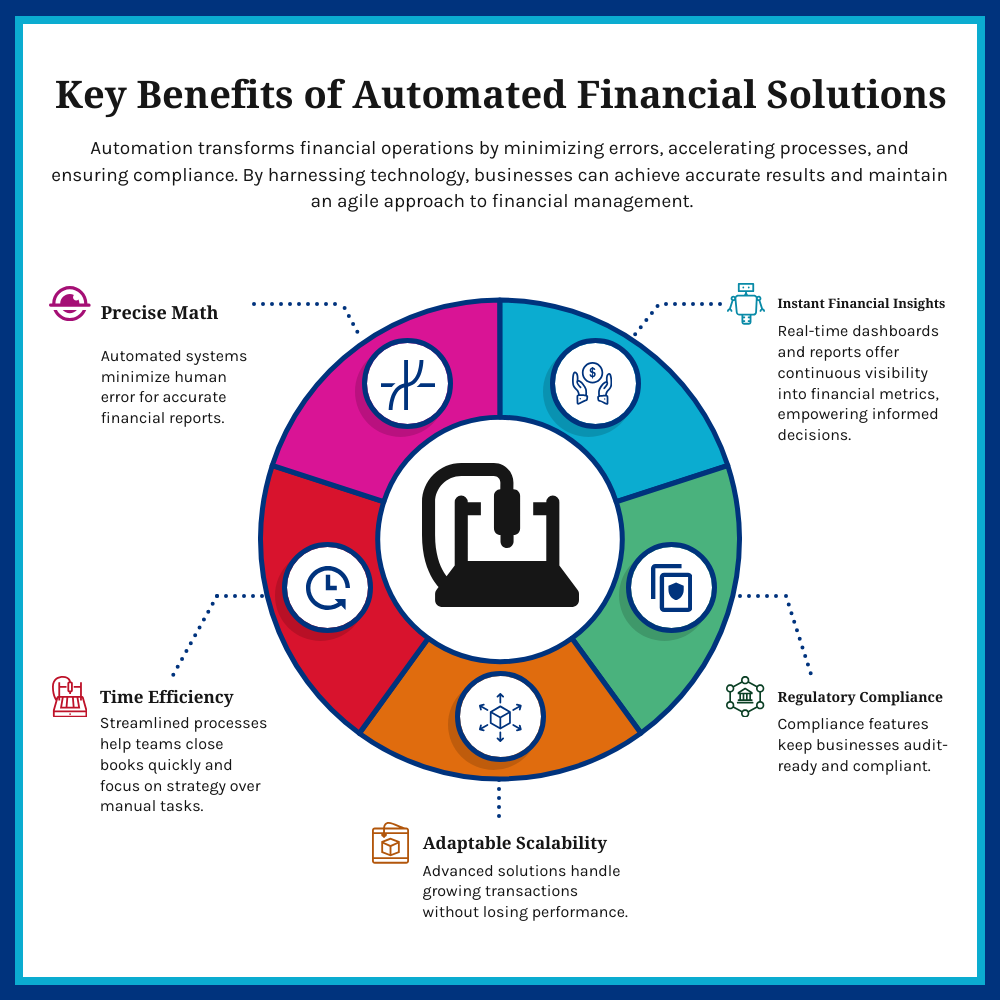
Investing in dedicated software for deferred revenue calculation offers several advantages:
-
Accuracy: Automated calculations reduce the risk of manual errors.
-
Efficiency: Streamlined workflows save time, enabling faster financial closes.
-
Scalability: Advanced tools handle high transaction volumes with ease.
-
Compliance: Built-in adherence to regulatory standards ensures audit readiness.
-
Real-Time Insights: Dynamic dashboards and reports provide up-to-date visibility into financial health.
Choosing the Right Tool
Selecting the right deferred revenue tool depends on several factors:
-
Business Size: Smaller businesses will naturally gravitate to QuickBooks, while larger enterprises benefit from Intaact, NetSuite or RevPro.
-
Industry Needs: SaaS and subscription-based businesses should prioritize tools with robust recurring revenue features.
-
Integration Capabilities: Ensure the tool integrates seamlessly with your existing ERP, CRM, and billing systems.
-
Budget: Assess the cost of implementation and subscription to ensure alignment with your financial capacity.
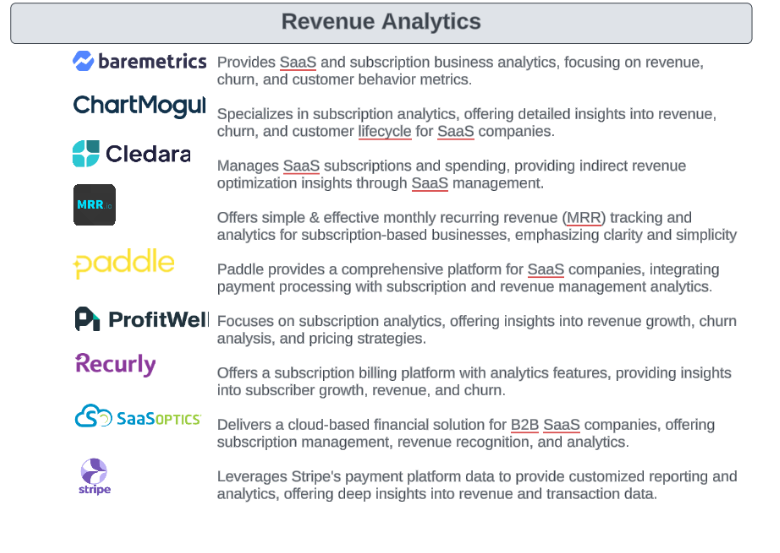
The complexities of deferred revenue management necessitate a shift from spreadsheets to specialized tools. By investing in modern solutions, companies can achieve greater accuracy, compliance, and efficiency, ultimately freeing up resources to focus on growth and strategy. Whether you’re a small business or a global enterprise, the right deferred revenue calculation tool can transform your financial operations, ensuring that you stay ahead in today’s competitive landscape. Here are some revenue analytics tool as well:
Go deeper: Guide 06, Leads-to-Cash Software, part of the CFO Guide Series: 24 one-page guides for CEOs and founders.
